Chromatogram
Chromatogram allows you to configure detailed settings
for chromatogram export.
To change whether the chromatogram is to be exported to PDF or not,
use the toggle shown in blue, which can be turned ON/OFF.
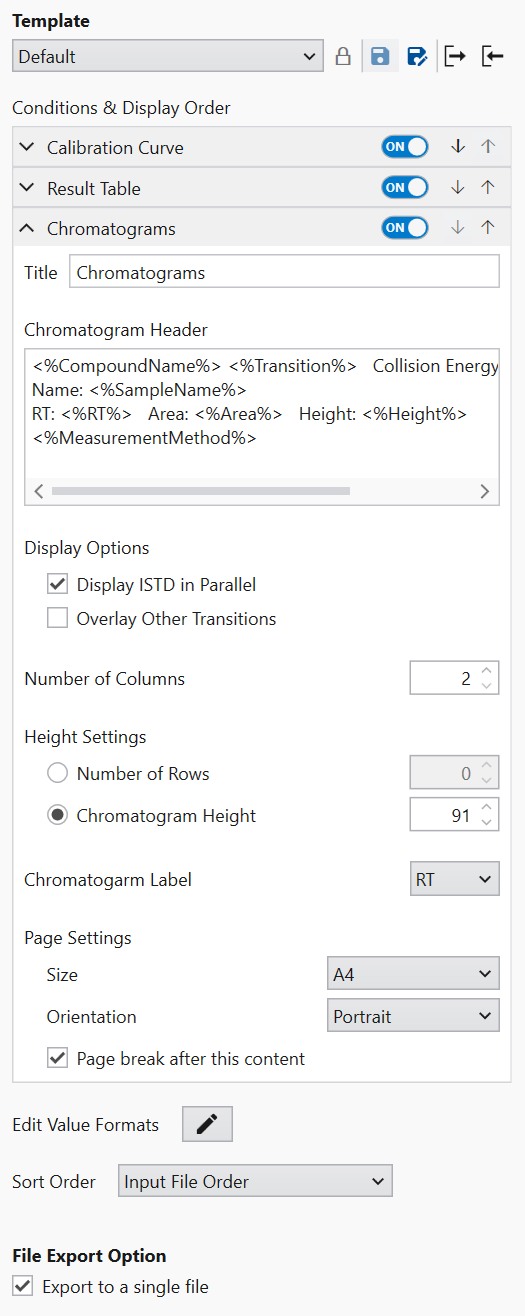
The title of the exported chromatogram can be changed
in the Title field.
Header information can be added to each chromatogram export.
If you enter “<%” in the Chromatogram Header field,
candidates for displayable content will be displayed.
Select the item to be exported from the candidates
and place it between “<%” and “%>”.
Entries other than those enclosed by “<%” and “%>”
will be displayed as they are at the top of the chromatogram.
If “Display ISTD in Parallel” is selected in the Display Options,
the ISTD chromatograms are displayed in addition to
the transitions of the compound being analyzed.
“Overlay Other Transitions” allows you to export chromatograms
of different transitions of the same compound by overlaying them.
“Number of Columns” defines the number of chromatograms
displayed per row.
The number of chromatogram rows printed on the paper is set in
Height Settings.
The number of rows displayed on the paper is determined
by the number of rows in “Number of Rows” or
by the height at which the chromatogram is displayed
in “Chromatogram Height”.
Set the paper size of the export destination using
Size in “Page Settings”.
If you want to write horizontally instead of vertically
as the default, change the “Orientation”.
If you need a page break after this page,
check “Page break after this content”.