Result Outlook
The Result Outlook window allows users to select which compounds are displayed in the Result Table.
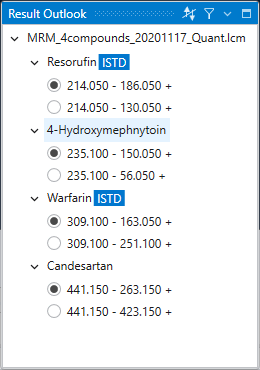
At the top of this window, the names of the measurement methods are displayed. If the same compound is measured using different measurement methods (conditions), the values obtained in the measurements cannot be compared, so this software classifies data by measurement methods prior to compounds. You can change the displayed measurement method name by right-clicking the measurement method name and selecting Rename from the context menu.
The compound names are displayed in the next level. The hierarchy below each compound name shows the measured transitions and their polarities. On performing quantitative analysis of a compound, you must select quantitation target transition within the compound. By checking the radio button at the beginning of transition, you can change the transition targeted for quantification. Note that this change can also be made in Compound Settings.
The display order of compounds is determined based on information in the raw data. This display order can be sorted in ascending or descending order based on compound name or Expected RT (Retention Time) by clicking the leftmost sort button on the window title bar. You can also change the compound name or undo the changes by right-clicking the compound name and selecting Rename or Reset from the context menu.
When dealing with many compounds, it is useful to limit the compounds displayed in the Result Outlook window as necessary. By pressing the Filter button to the right of the sort button, a setting window will appear to limit the displayed compounds. By setting the conditions for the displayed compounds in this window, you can limit the compounds displayed in Result Outlook.