Compound Settings
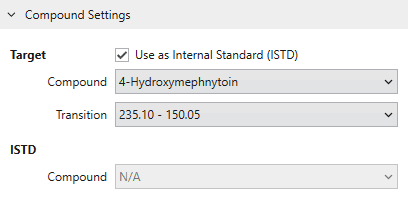
Compound Settings are applied to the selected compound displayed in tab format in the workspace.
If you want to use the target compound as internal standard (ISTD), check “Use as Internal Standard”.
This allows you to select it as ISTD to be referred in the settings of other compounds.
On Cascade, it is necessary to select one transition for quantification for each compound. This transition is called a primary transition.
The primary transition can be changed by selecting it from the Target Transition list. You can also select from the radio buttons in Result Outlook.
On configuring a comopund other than ISTD (target compound), select the ISTD you want to associate to the target compound from the ISTD Compound list.