Reanalysis
Reanalysis resets the
Peak Detection Parameters
for all existing analysis results and performs a new analysis.
See “Peak Detection Parameters”
to set the Peak Detection Parameters.
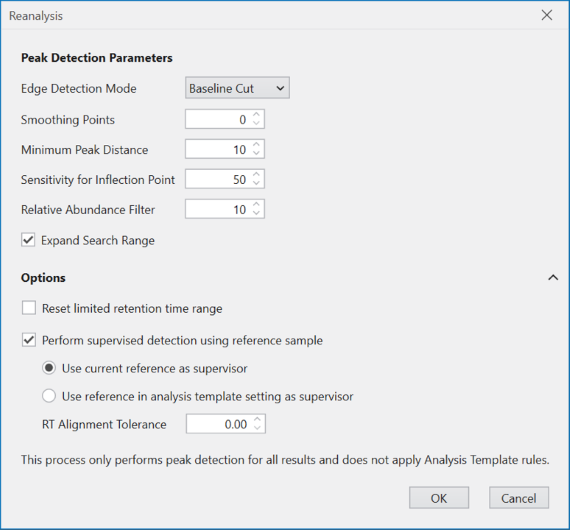
If you have limited the RT range of the chromatogram
to be analyzed using this
Chromatogram Settings
in Dashboard,
consider checking the “Reset limited retention time range”.
By checking this box, you can reset the RT range
of the chromatogram for peak detection.
If “Perform supervised detection using reference sample”
is checked, Supervised Detection
will be performed during reanalysis.
If “Use current reference as supervisor” is selected,
Supervised Detection
will be performed using the reference in the existing
analysis results as the supervisor,
regardless of the
Analysis Template setting.
If Supervised detection is to be performed
based on the reference sample defined by
Rules
in Analysis Template,
select “Use reference in analysis template setting as supervisor”.
Note
Note that even if you select “Use current reference as supervisor”, Supervised Detection will be performed based on the Peak Detection Parameters given above, not based on the existing peak detection result of the reference in the existing analysis results.