Detection Criteria Page
The Detection Criteria page defines the method for peak detection.
Peaks are detected based on the parameters defined in Peak Detection Parameters Page,
but if multiple peaks are detected in one chromatogram, it is necessary to judge which peak should be the detection result.
If you select “Select peak with the highest intensity” in “Criteria for peak selection”,
the peak with the highest intensity among multiple peaks will be the peak detection result.
“Select peak with the RT nearest to expected RT” selects the peak nearest to the RT value, defined in the measurement method,
at which the peak is expected to be found.
However, if the measurement method does not include the expected RT value,
the peak with the highest intensity will be used as the peak detection result, similar to when “Select peak with the highest intensity” is selected.
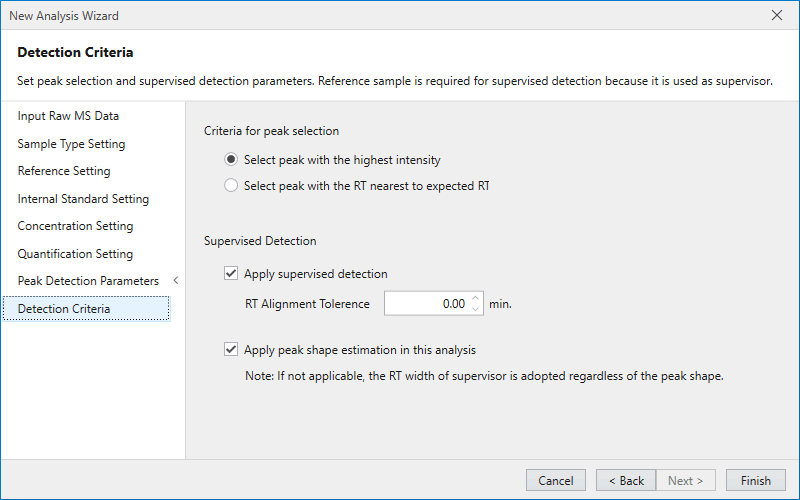
In the item labeled “Supervised Detection”, set whether or not to execute Supervised Detection, and define the behavior when executed.
Supervised Detection requires an indicator peak (Supervisor),
and on performing a new analysis, the peak detection results in the reference sample are used as supervisor.
Therefore, even if “Apply supervised detection” is checked, analysis cannot be performed if a reference sample is not set.
“RT Alignment Tolerance” is a parameter for chromatogram alignment performed prior to Supervised Detection.
This value sets the expected maximum RT deviation on aligning chromatograms between samples to detect peaks with the supervisor.
If the value is 0, no chromatogram alignment is performed.
“Apply peak shape estimation in this analysis” sets whether to estimate the peak shape according to the shape of the supervisor when performing Supervised Detection.
If this setting is not enabled, determine where the supervisor peak start position (RT) and end position (RT) correspond in the chromatogram after alignment,
and use the determined time region as the peak range.
Therefore, a peak with the same peak width as supervisor will be detected, but please be aware that it is not guaranteed that a peak-like shape will be obtained.
Note
When performing supervised detection in a new analysis, the reference sample is used as supervisor. Thus, analysis cannot be performed if a reference sample is not set.
Note
Even if all settings in the New Analysis Wizard have not been completed, the analysis will start by pressing the Finish button.